Scheduling

A calendar built for the front desk's whole day.

Every practitioner and room in view, the next opening one search away, and reminders that reduce no-shows.

app.outsmartemr.com
The calendar

Everyone you need, side by side.

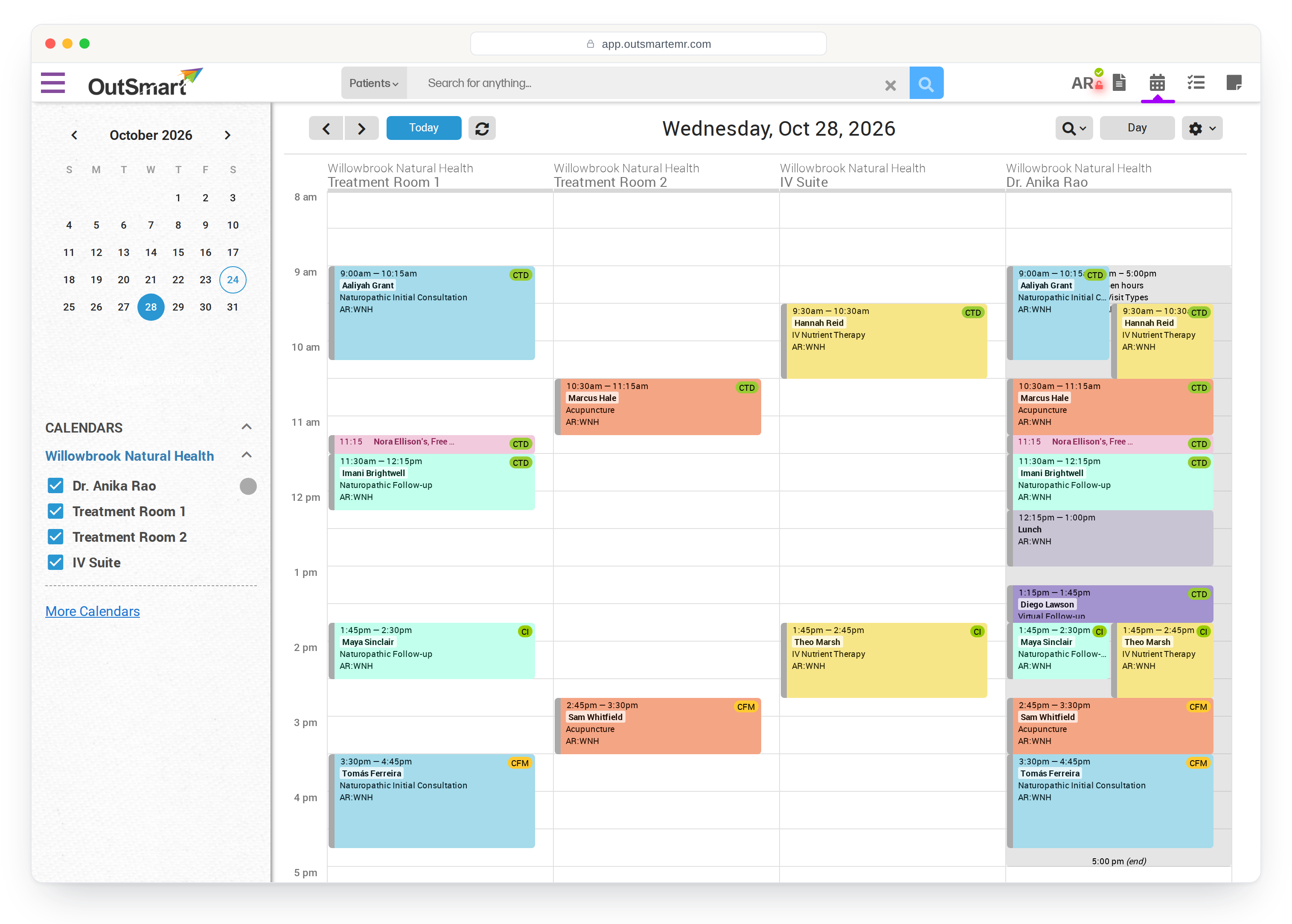
Practitioners and rooms sit in their own columns, from every location you work at. Save the calendars you look at together as a group and switch to it in one click. Colour by appointment type or by practitioner, whichever the front desk reads faster.

  • Day, five day, week and month views
  • Practitioner and room columns, across all your locations
  • Saved calendar groups, so each person sees the calendars they work with
  • Drag an appointment to move it, with an optional check before it moves
  • Overlapping appointments drawn stacked or side by side, your choice
  • Changes from the rest of the team appear on your calendar within a minute, without reloading
  • A calendar on your phone as well as on your desk
See it in a demo
A day in the calendar with three rooms and the practitioner in columns, appointments coloured by type, statuses, a lunch block and overlaps shown side by side
Finding a time

The next opening, in one search. Or the waitlist, if there is none.

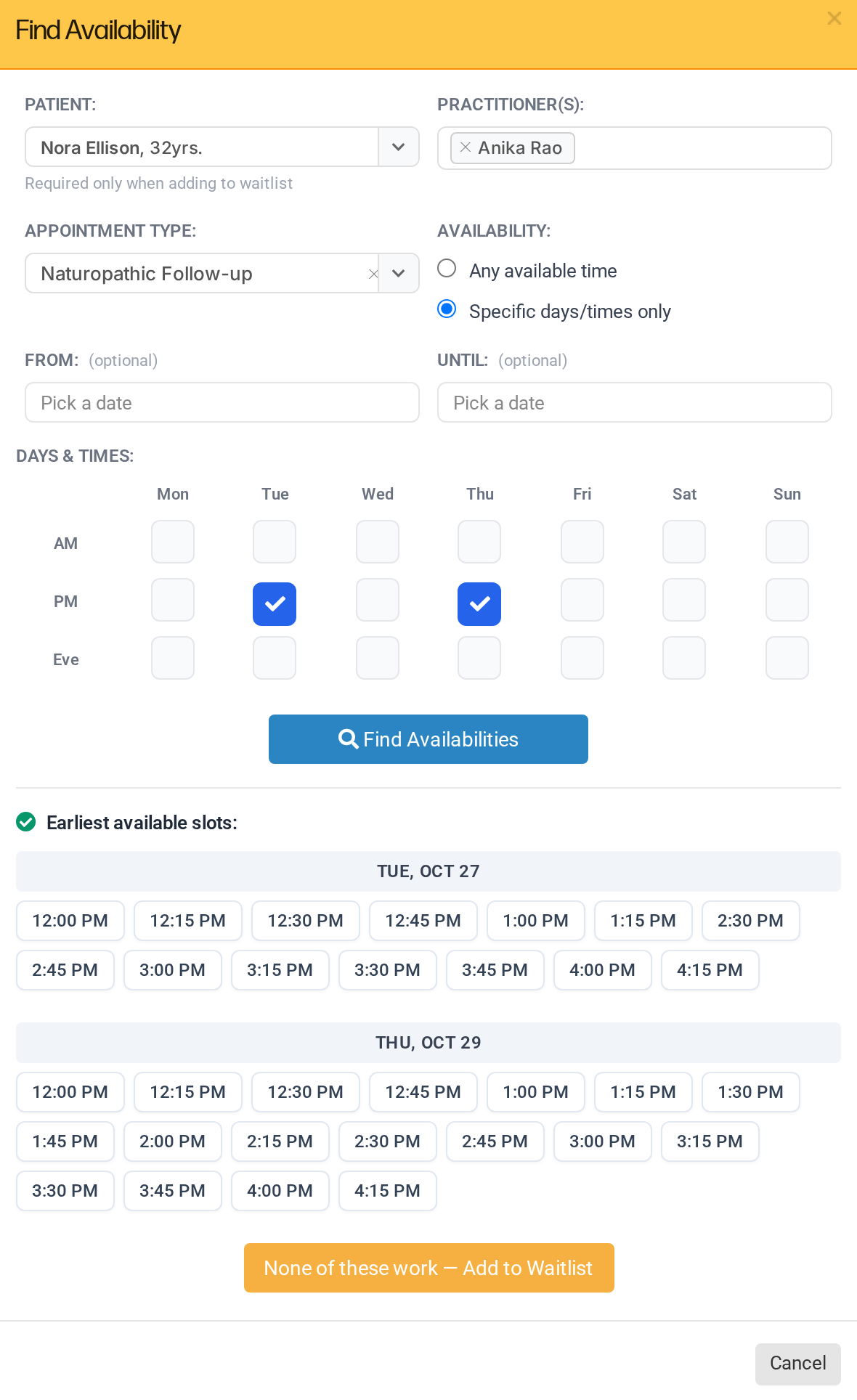
Pick the patient, the practitioners and the kind of visit, say mornings or evenings, and Find Availability looks up to a year ahead. If nothing suits, the same form puts them on the waitlist, and the waitlist keeps matching them to openings as your calendar changes.

  • Search one practitioner or several at once
  • Morning, afternoon or evening, on the days that suit the patient
  • Click a time and the appointment is drafted for you
  • Nothing suitable? Add them to the waitlist from the same screen
  • Waitlist entries flagged by how soon a matching opening exists
  • Offer an opening by email or text in one click, with a record of what was sent
Book a demo
Find Availability with a patient, practitioner and visit type chosen, Tuesday and Thursday afternoons ticked, the open times listed and the Add to Waitlist button
Reminders

Fewer no-shows, without a morning on the phone.

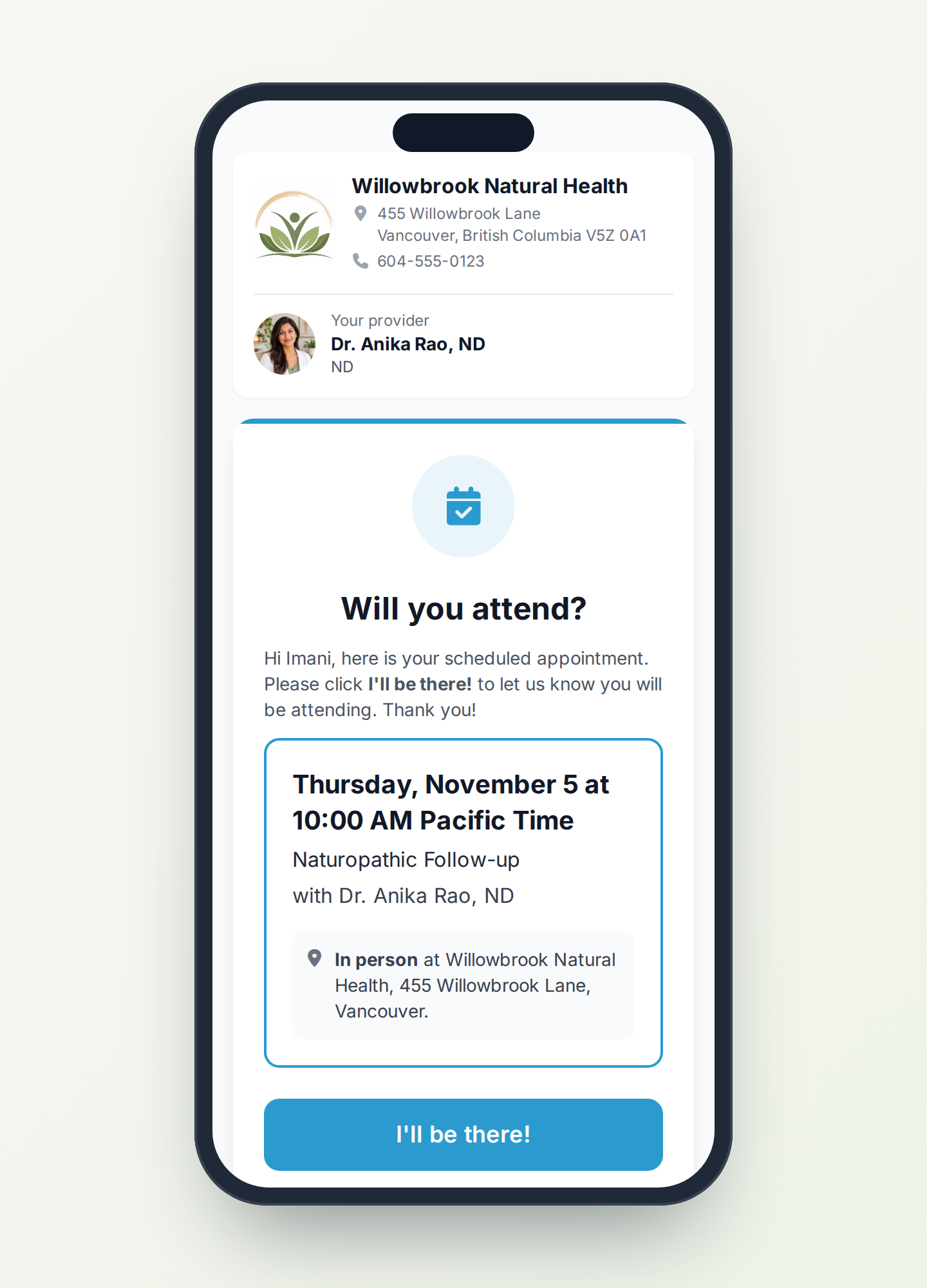
Set reminders for each kind of appointment, by email, by text or both, at the times that suit your clinic. Patients confirm on a page with your logo and their practitioner's photo, and once they tap I'll be there, the reminders stop.

  • Email and text message reminders, set per appointment type
  • A confirm page with your branding, one tap to say they are coming
  • Link previews and email scanners cannot confirm by accident
  • Video visits get their join link in the reminder
  • Confirmation emails with your own message and attachments
  • Every appointment keeps a log of exactly which message went out
See it in a demo
The patient's Will you attend? page on a phone, with the clinic, the practitioner's photo, the appointment and the I'll be there button

The rest of the front desk's day.

The details that keep a busy day running smoothly.

A daily schedule to work from

Check patients in and out, open their file, start the chart with the right type already chosen, and see unfinished intake forms and booking answers at a glance.

Statuses that mean something

Booked, confirmed, checked in, completed, no show, cancelled with or without notice. Reports later can tell the difference.

Print the day

A printed schedule for one practitioner or the whole clinic, with breaks, notes and descriptions in or out.

Open hours that know your rooms

Set hours by practitioner, limit them to certain kinds of visit, or only offer a time when the room or the IV chair is free.

Online bookings never collide

Bookings from your booking page land straight in the calendar and never double book a practitioner or a room. Staff can still overlap on purpose.

Alerts while you book

Flag a patient once and the note shows in red every time someone books them, so nobody misses it.

Reschedule or rebook

Move an appointment, or copy it forward as the next visit and leave the original where it was.

Find anything, undo mistakes

Search the calendar by patient, practitioner, type or status, and bring back an appointment someone deleted.

Google Calendar

Each practitioner can send their OutSmart appointments to a Google Calendar of their choice, to see the day on their phone.

Each location's own time zone

Every office keeps its own time zone, including the 2026 change for clinics in provinces that stopped changing their clocks.

Private or shared calendars

Practitioners decide whether their calendar is visible to the office and who else may edit it.

Breaks and blocked time that repeat

Lunch, meetings and holidays as their own repeating events, which keep online booking out without locking out the front desk.
Online booking

Let patients book themselves, straight into this calendar.

Your branded booking page uses the same open hours, rooms and rules as the front desk, so every online booking lands in the calendar without a clash.

See the booking page

See how OutSmart would work in your clinic.

Book a demo and we will walk you through the parts that matter most to you.